
All information on this page about these rigs is based around the OpenGD77 firmware.
The Retevis RT90 is a conventional 2m/70cm (FM only) radio with satellite, DMR and optional GPS, which allows loading of custom firmware “OpenGD77”. Also known as a TYT MD-9600, the rig has a couple of limitations like 32 contacts per talkgroup and 80 TG’s per zone but these are overcome by direct keypad entry of any contact number (making contact lists almost unnecessary) and how digital talkgroups reference a central repository of contacts, rather than the insanity of creating duplicate talkgroup sets per repeater. Like all DMR rigs (which are based on commercial radios) they can be complicated for the newcomer. But where OpenGD77 succeeds is its ease of programming these radios and then focusing the user on what is most important for amateur radio. The rig can be controlled almost entirely from the microphone.
- “Master” OpenGD77 User Guide – Extensive manual for rigs up and running with that firmware.
- The installation guide for the custom firmware is at the OpenGD77 website
The microphone can play a role in tutoring users to DMR.
If your brain turns to mush, REMEMBER: ONLY 505 and Parrot are on slot 2 using the VK-DMR network
EVERYTHING else is on slot 1. Keep an eye on the slot indicator relative to the talkgroup.
Below is a cheat sheet but the most useful functions are:
| Mic Button | Command | Long push | Long [D] Modified |
|---|---|---|---|
| # | Direct TG entry or DTMF | Reverse Repeater | – |
| * | DMR slot 1 or 2 or FM wide/narrow | Clear timeslot override | DMR or FM |
| B and C DMR mode | UP/DOWN contacts | – | POWER |
| B and C FM mode | Squelch adjust | – | POWER |
| ARROWS | UP/DOWN talkgroups | UP = scan DOWN = stop | ZONES |
| A/B | Menu/Enter | Quick menu | Channel details |
| A/B (Satellite mode) | Cancel Alarm | – | SET ALARM for 1 minute before next pass |
| Front Panel | Command | Long Push | Combo |
|---|---|---|---|
| P1 | – | Open squelch | P1 + up/down = POWER |
| P1 | – | – | P1 + KNOB = ZONE or swap RX/TX in VFO |
| P2 | RX/TX frequencies | RX/TX frequencies | P2 + KNOB = change Talkgroup by FREQ |
| ORANGE | Quick menu for either VFO or memory modes. | – | quick double push = toggle VFOA/VFOB |
| BAND/ESC | Memory/VFO | toggle VFOA/VFOB (in VFO mode) | – |
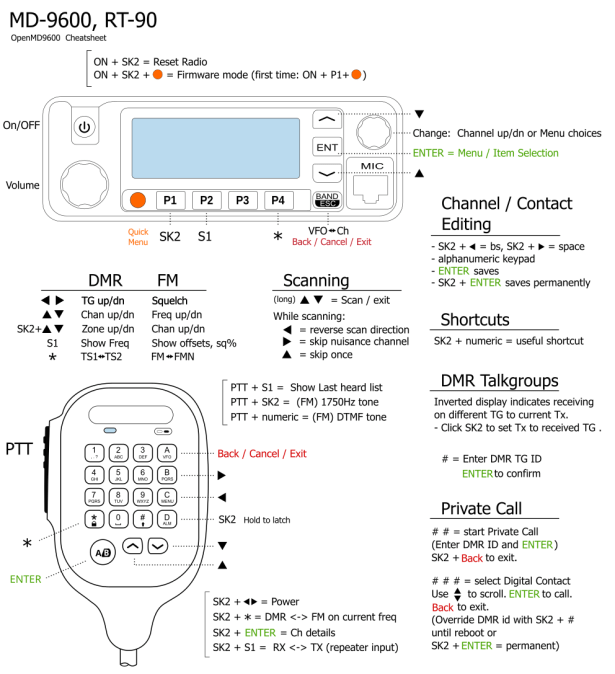
Firmware upgrade mode.
Firmware or DFU mode is not required just to upload/download codeplugs. This is for major firmware revisions to the hardware only.
- Switch off radio.
- To do this with the STOCK firmware loaded:
- *Disconnect the power cable, *(Disconnecting power not required once openGD77 is loaded)
- Hold down orange + P1 + power buttons and at the SAME TIME, while holding the above buttons, connect the power cable to the rig,
- The display will flash to indicate DFU mode.
Limitations of Codeplug
Number of Contacts = 1024
Number of Channels = 1024
Number of Zones = 68
Number of Talkgroups in a Zone = 80
Number of TG lists = 76
Number of TGs in a TG List = 32
| Notes |
|---|
| Signal strength bar graph. In both FM and DMR modes, the signal strength of the received signal is shown as a bar graph across the width of the screen. 100% bar graph is approximately S9 +40dB. |
| The VFO –> New Chan option, creates a new channel using the current VFO settings. The name of the new channel uses the format “New channelNNN”, where NNN is the next available number in the All Channels zone. The Channel will also be added to the currently active Zone in the Channel screen. If the Channel screen is set to the All Channels zone, the channel will be added to that zone. |
| When a TG has been manually entered, the display shows a 1 pixel box around the TG display area to indicate that this TG has been manually entered, even if the Contact / TG name is displayed rather than the TG number. |
| In satellite tracking mode, the current RSSI signal strength is shown at all times as a vertical bar, so that operators can adjust their antennas for maximum signal. |

 wacrs.org